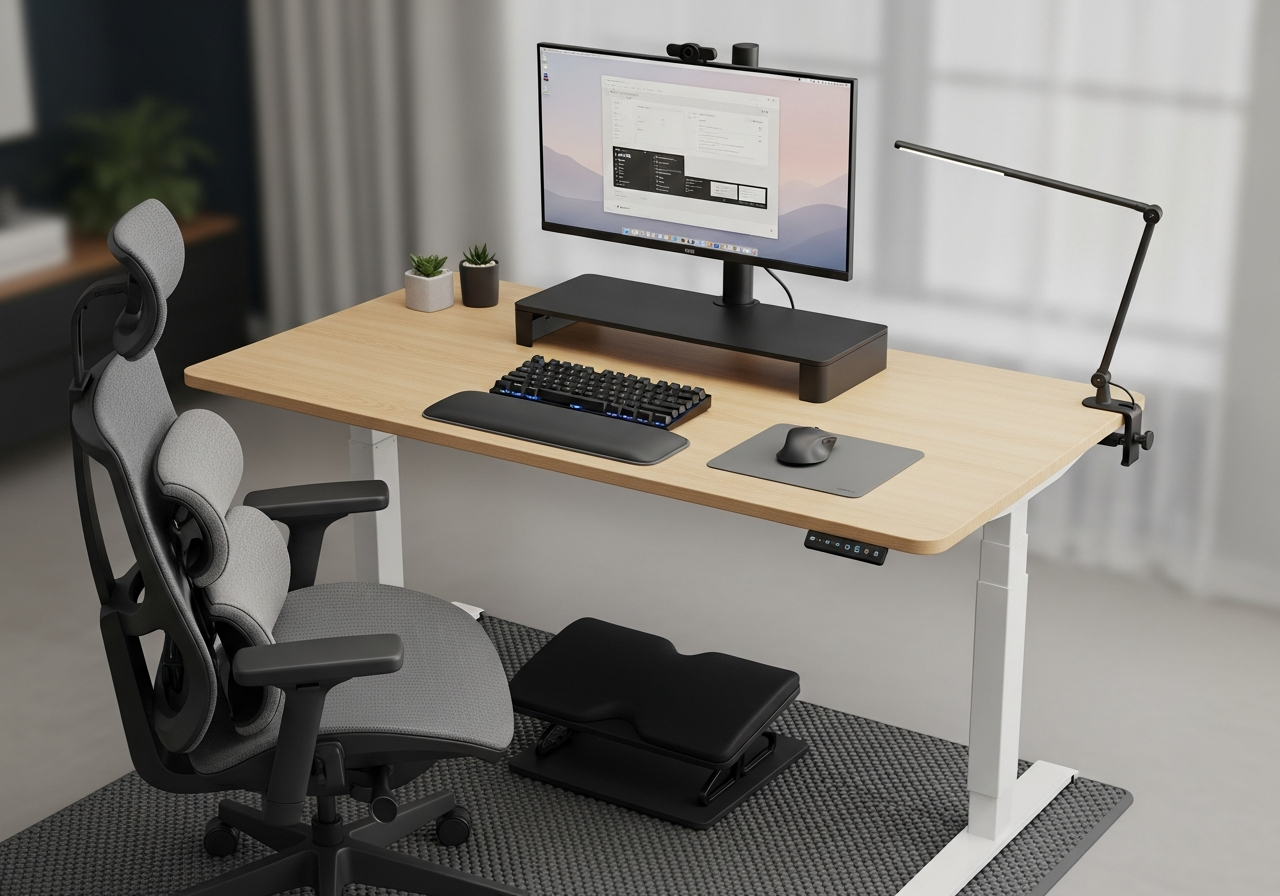
Home Office Ergonomics Essentials Checklist — Your Complete Guide
Upgrade your workspace with ergonomic essentials that reduce pain and boost productivity. Your complete essentials checklist — find out exactly what you need to buy and what can wait.
If you work from home, your body is paying the price for a bad setup. This ergonomic kit addresses the most common pain points — back strain, wrist fatigue, neck tension, and eye strain — with proven solutions that make your desk a healthier, more comfortable place to spend 8+ hours a day.
Here is everything included in this bundle at a glance:
Ergonomic Footrest ($20 - $45) — Essential
Lumbar Support Pillow ($20 - $40) — Essential
Monitor Riser / Stand ($15 - $40) — Essential
Keyboard Wrist Rest ($10 - $25) — Essential
Anti-Fatigue Standing Mat ($25 - $60) — Essential
LED Desk Lamp ($20 - $50) — Essential
Cable Management Kit ($10 - $20)
Ergonomic Vertical Mouse ($15 - $40) — Essential
Sit-Stand Desk Converter ($80 - $250)
Blue Light Blocking Glasses ($10 - $30)
Must-Have Items (7)
These are the core items required to get started. Do not skip these.
Ergonomic Footrest — $20 - $45 Adjustable-angle footrest to support proper posture and reduce lower back strain.
Lumbar Support Pillow — $20 - $40 Memory foam back cushion that maintains the natural curve of your spine.
Monitor Riser / Stand — $15 - $40 Desktop stand that elevates your monitor to eye level for proper neck alignment.
Keyboard Wrist Rest — $10 - $25 Gel or memory foam wrist pad that keeps wrists neutral while typing.
Anti-Fatigue Standing Mat — $25 - $60 Cushioned mat for standing desk users to reduce foot and leg fatigue.
LED Desk Lamp — $20 - $50 Adjustable LED lamp with brightness and color temperature controls to reduce eye strain.
Ergonomic Vertical Mouse — $15 - $40 Vertical mouse design that keeps your wrist in a natural handshake position.
Nice to Have (3)
These optional items improve convenience, presentation, or overall experience.
Cable Management Kit — $10 - $20 Clips, sleeves, and ties to organize desk cables and reduce clutter.
Sit-Stand Desk Converter — $80 - $250 Desktop riser that converts any desk into a sit-stand workstation.
Blue Light Blocking Glasses — $10 - $30 Computer glasses that filter blue light to reduce digital eye strain.
Why Ergonomics Matter for Remote Workers
Working from a dining table or couch might seem fine for a day, but over weeks and months it leads to chronic back pain, carpal tunnel symptoms, neck stiffness, and eye strain. Proper ergonomic equipment isn't a luxury — it's an investment in your long-term health and productivity.
The Ergonomic Setup Checklist
**Monitor at eye level** — the top of the screen should be at or slightly below eye level
**Elbows at 90 degrees** — your forearms should be parallel to the floor when typing
**Feet flat on the floor** — or on a footrest if your chair is too high
**Back supported** — lumbar support should fill the curve of your lower back
**Wrists neutral** — not bent up or down when typing
Essential Ergonomic Upgrades
Start with a **lumbar support pillow** if you can't afford a new chair — it's the single biggest improvement for back pain. A **monitor riser** or arm gets your screen to the right height. A **keyboard wrist rest** prevents carpal tunnel. And an **anti-fatigue mat** is essential if you use a standing desk.
Tips for a Healthier Workday
Follow the **20-20-20 rule** for eyes: every 20 minutes, look at something 20 feet away for 20 seconds
Stand up and move for 5 minutes every hour
Alternate between sitting and standing if you have a sit-stand converter
Keep your most-used items within arm's reach to avoid repetitive twisting
Invest in a good desk lamp — poor lighting causes eye strain and headaches
Common Mistakes to Avoid
Putting the monitor too low — laptop screens are almost always too low without a riser
Using a regular mouse for hours — ergonomic mice reduce wrist strain significantly
Ignoring your feet — dangling feet create back pressure; use a footrest
Skipping breaks — no amount of ergonomic equipment replaces regular movement
Frequently Asked Questions
What's included in the Home Office Ergonomics Kit bundle?
This bundle includes 10 carefully selected items organized by priority: 7 must-have essentials, 3 nice-to-have upgrades, and 0 down-the-road additions.
How much does the Home Office Ergonomics Kit cost?
The estimated total for this bundle is $100 - $350. You can buy individual items based on your budget and priorities.
What are the must-have items in this bundle?
The 7 essential items are: Ergonomic Footrest, Lumbar Support Pillow, Monitor Riser / Stand, Keyboard Wrist Rest, Anti-Fatigue Standing Mat, LED Desk Lamp, Ergonomic Vertical Mouse.
Can I buy individual items instead of the full bundle?
Yes! Each item links directly to Amazon where you can purchase individually. Start with the must-have items and add nice-to-haves over time.
How are products selected for this bundle?
We research customer reviews, expert opinions, and real-world performance data to select the best products at various price points for each item category.
As an Amazon Associate, BundleMatchly earns from qualifying purchases. Prices are approximate and may change.